The short answer
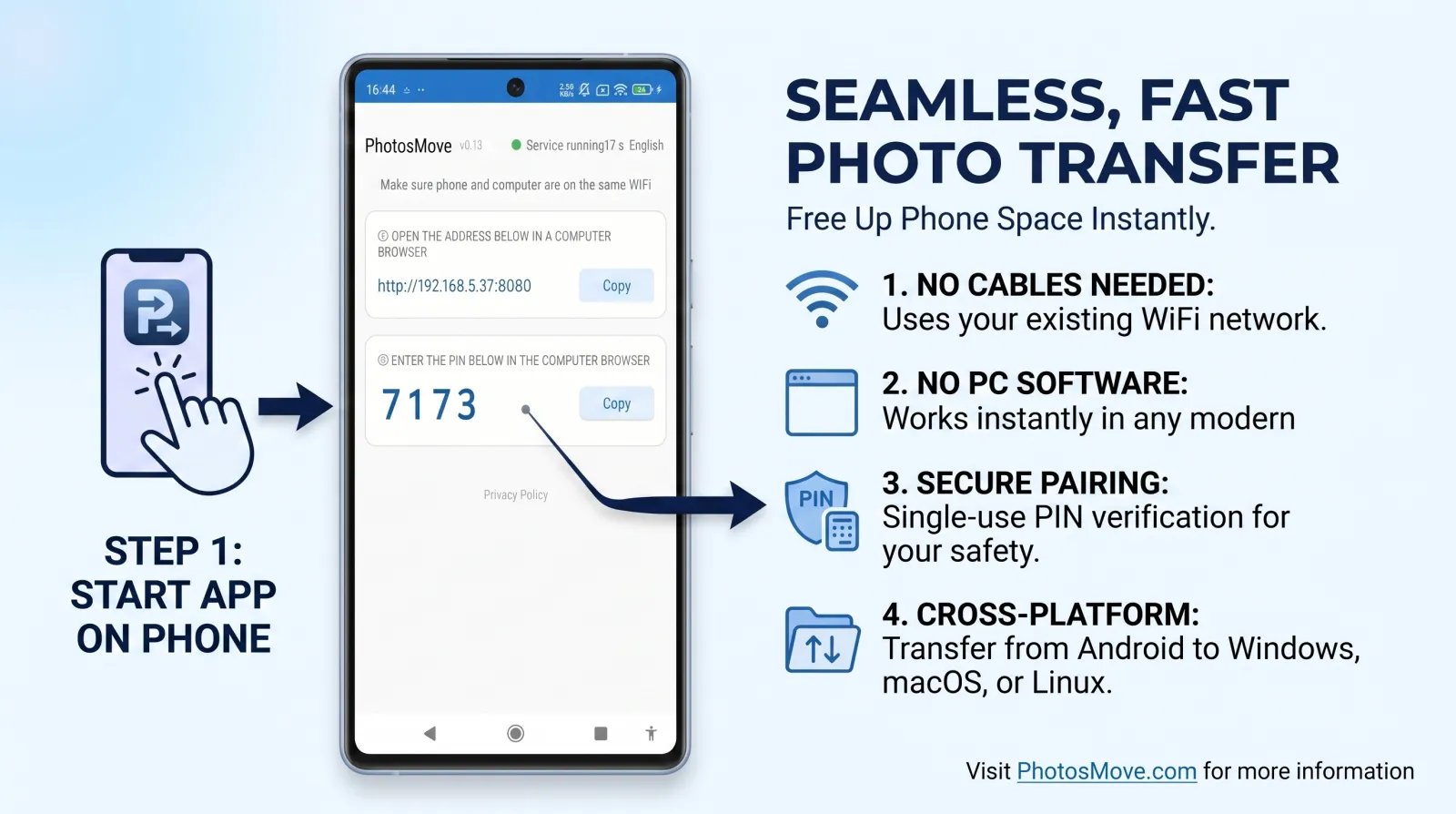
Install PhotosMove on your Android phone, start it, open the shown address in Safari (or Chrome) on your Mac, enter the PIN, and download your photos as one verified ZIP. Nothing to install on the Mac, no MTP, no AirDrop workarounds, and your RAW/HEIC originals arrive byte-perfect.
Why Android-to-Mac transfers are uniquely painful
- No native protocol. macOS has no built-in Android file access. The Finder treats Android phones as MTP cameras at best — and often not even that.
- Android File Transfer is abandonware. Google's official utility hasn't been meaningfully updated in years. On current macOS it freezes, drops connections mid-copy, and occasionally delivers silently incomplete folders. Searching any forum shows the same complaints.
- Image Capture and Photos skip files. Both rely on PTP/MTP camera-style importing, which frequently ignores RAW/DNG and Live Photo pairs, or imports them with mangled names.
- AirDrop is Apple-only. There is no official way to AirDrop from Android. Third-party "AirDrop-like" apps either depend on cloud relays or require a companion app on the Mac.
Methods for Android to Mac, compared
The methods in detail
Method 1 — Android File Transfer (Google's official app)
Install Google's free utility, connect the phone by USB, and drag the DCIM folders across in Finder-style windows.
- Pros: Free and official; direct USB speed; no cloud involved.
- Cons: Effectively unmaintained for years; freezes and mid-copy disconnects on modern macOS; chokes on large libraries; occasional silent corruption; no integrity check.
Method 2 — Image Capture / Photos import
macOS's built-in importers can see some Android phones in PTP mode and pull photos into the Photos library.
- Pros: Already on your Mac; simple for small, camera-style batches.
- Cons: PTP/MTP support is inconsistent across brands; RAW/DNG and Live Photo pairs are often skipped or renamed; imports flatten your folder structure into the Photos library.
Method 3 — Cloud (Google Photos, Drive, Dropbox)
Upload from the phone, download on the Mac.
- Pros: Works over any distance; doubles as off-site backup; no cable.
- Cons: Uploading a full library takes days; compression or re-encoding on some tiers; quota costs; HEIC/RAW handling varies; photos leave your control.
Method 4 — PhotosMove (local Wi-Fi)
Start PhotosMove on the phone, open the shown address in Safari or Chrome on the Mac, enter the PIN, and download one verified ZIP.
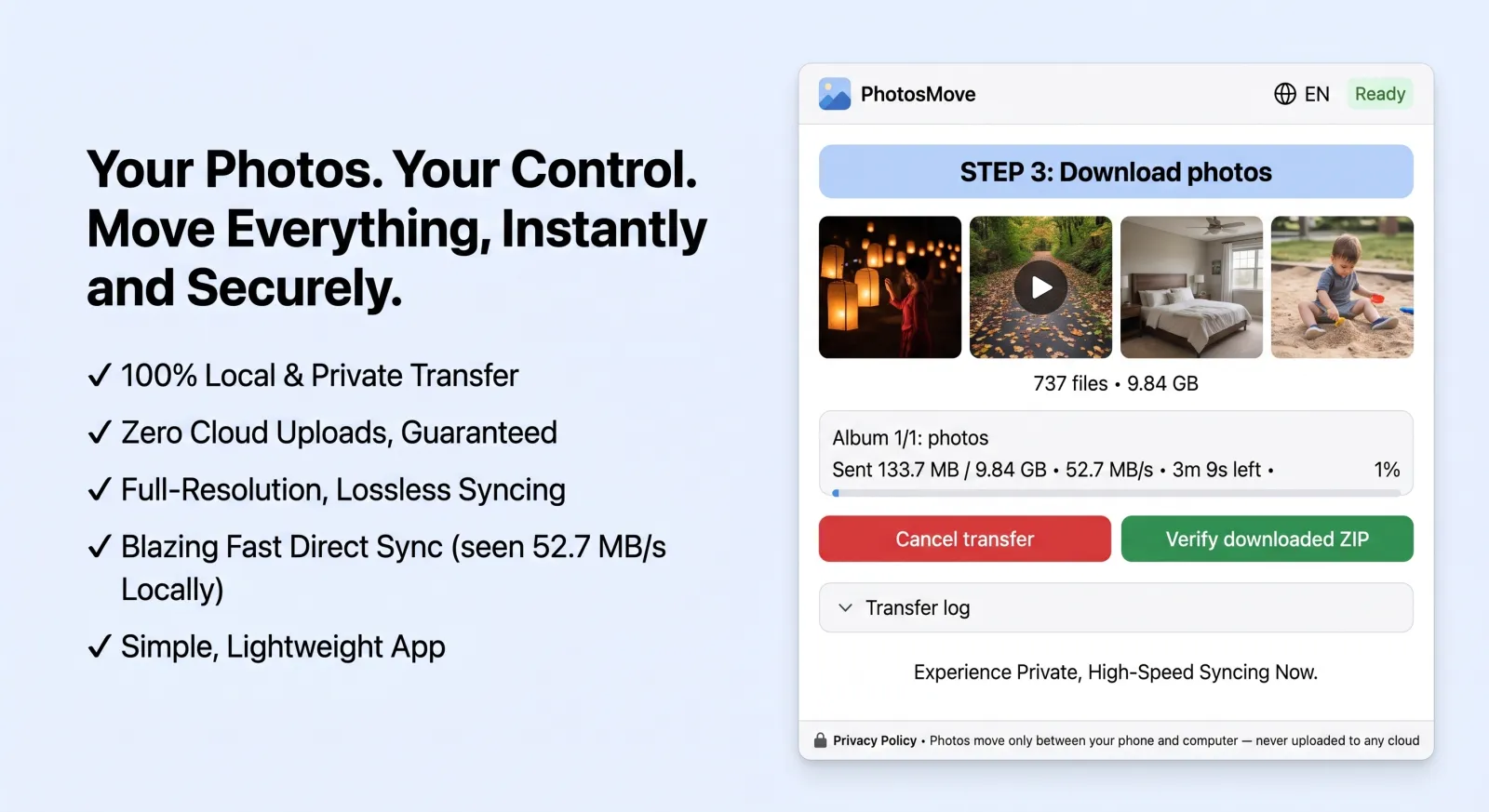
- Pros: No Mac software at all — just a browser tab; byte-perfect originals including RAW/HEIC with EXIF; keeps album folders; SHA-256 verification; reliable at 100GB+.
- Cons: Phone and Mac must share the same Wi-Fi; you unzip one archive when done.
If you want a local Wi-Fi solution with no Mac software and no cloud upload, PhotosMove is designed for this use case.
How to transfer photos from Android to Mac (PhotosMove)
-
Start the app on your phone
Install PhotosMove and tap start. Your phone serves your albums on the local network.
-
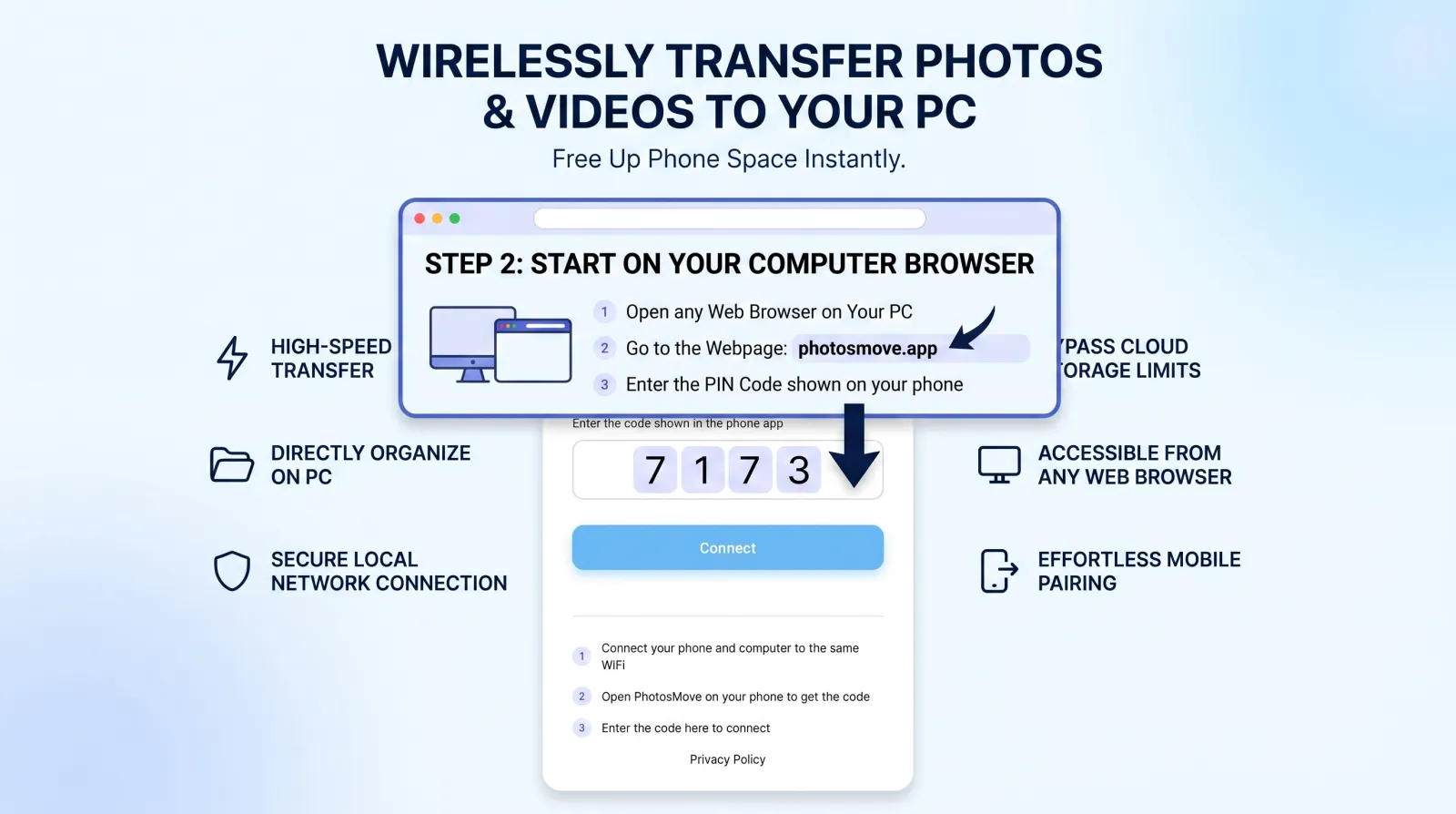
Open the connect page in Safari
Same Wi-Fi, open the address shown in the app and enter the 4-digit PIN.
-
Download one ZIP — your entire library at once
Download the streaming ZIP and let the SHA-256 check confirm every RAW, HEIC and video arrived intact.
-
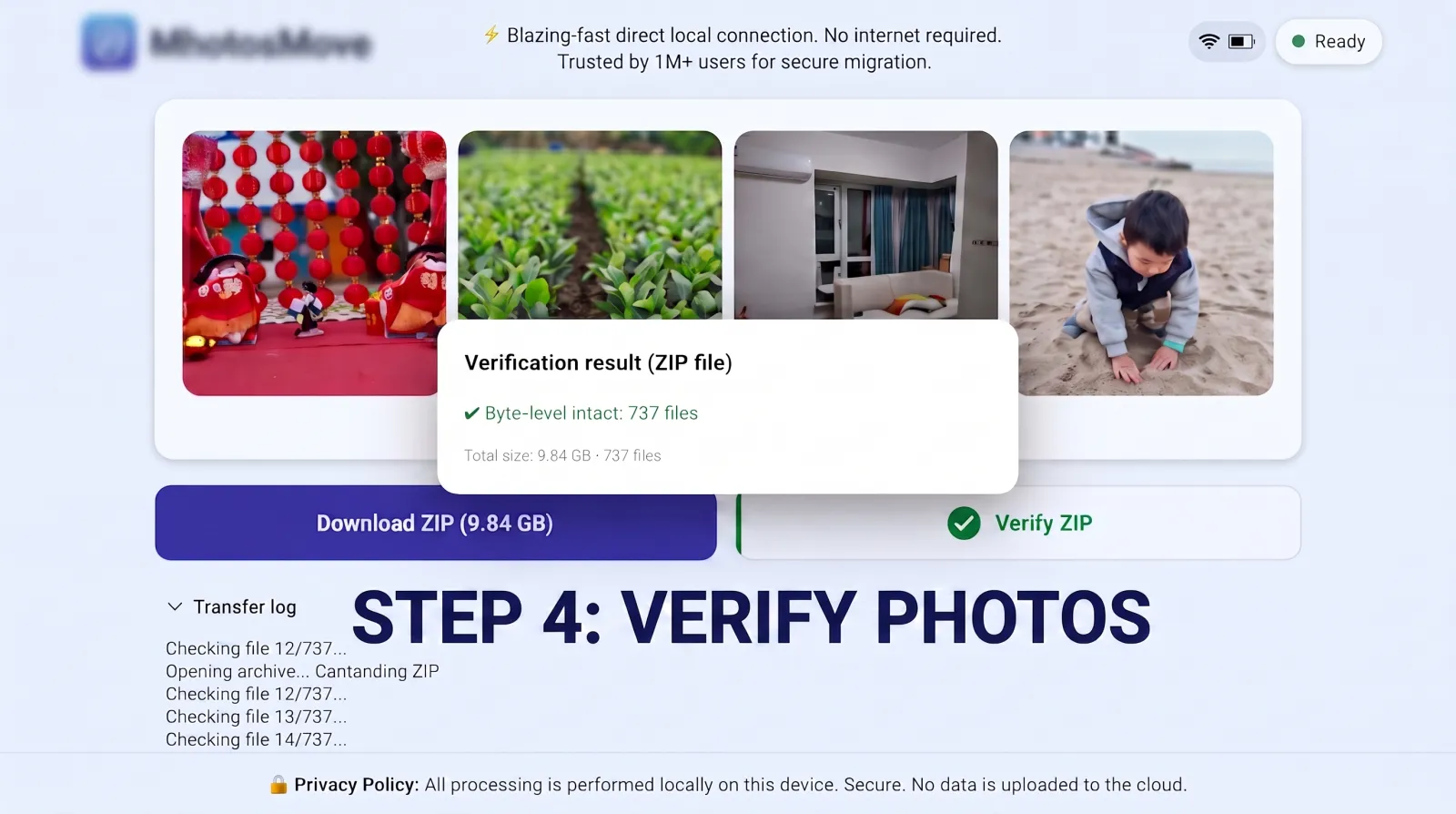
Verify it byte-for-byte
PhotosMove computes a SHA-256 checksum locally in your browser and compares it with the transfer manifest — green means every file arrived byte-perfect.
After the transfer: importing into Photos app
Once the ZIP is on your Mac, unzip it, then either:
- Keep the folders as-is for a file-based library (great if you use Lightroom, Capture One or just Finder).
- Import into the Photos app via File → Import, keeping "Keep Originals" enabled in Photos → Settings → General so the app doesn't re-encode your HEIC or RAW files.
The deeper problem: USB on a Mac is a rabbit hole
Even when you do have a cable, Macs are the worst platform for USB photo transfer:
- PTP vs MTP vs ADB. Android phones expose several USB modes; over PTP (the camera protocol macOS likes best) you often only see the DCIM folders, and RAW files shot to custom paths are invisible. In MTP mode, macOS Finder support is spotty and depends on phone vendor drivers that many brands simply don't ship for Mac.
- Many USB-C cables are charge-only. If your Mac shows the phone as "charging" but never mounts it, the cable has no data lines. Swapping cables is the first fix to try — and a frustrating one to discover mid-setup.
- ADB is the power-user workaround. Enabling developer options and using
adb pull works reliably, but it's a command-line workflow most people don't want to learn just to move photos.
This is precisely why a browser-based Wi-Fi transfer removes an entire class of failure: there's no USB mode negotiation, no driver, no cable to swap.
Frequently asked questions
Is there a native way to transfer photos from Android to Mac?
No. macOS has no built-in Android file access, AirDrop doesn't work with Android, and the official Android File Transfer app has been effectively unmaintained for years.
Can I use Image Capture or Photos to import from Android?
Both rely on camera-style MTP importing, which is inconsistent and often skips RAW/DNG. For a full library, a dedicated transfer tool is more reliable.
Why does Android File Transfer freeze or crash on my Mac?
It hasn't been updated in years. Known issues include freezes on newer macOS, choking on large libraries, and occasional silent corruption — the usual reason Mac users look for alternatives.
Will HEIC photos open on my Mac?
Yes — macOS has supported HEIC natively since High Sierra (10.13). Photos, Preview and Quick Look all handle it. See the HEIC guide for EXIF details.
Your photos deserve better than Android File Transfer.
PhotosMove — free, open source, works in any browser on your Mac.
No account · No cloud · No PC software
Related guides